Best AI Image Detection Tools in 2026 (Tested)
 Sana Bano
·August 9, 2026
·9 min read
Sana Bano
·August 9, 2026
·9 min read

We tested AI image detection tools in 2026. GPTOne flagged all 10 AI images in our own 60-image study. See the full comparison of the best detectors.
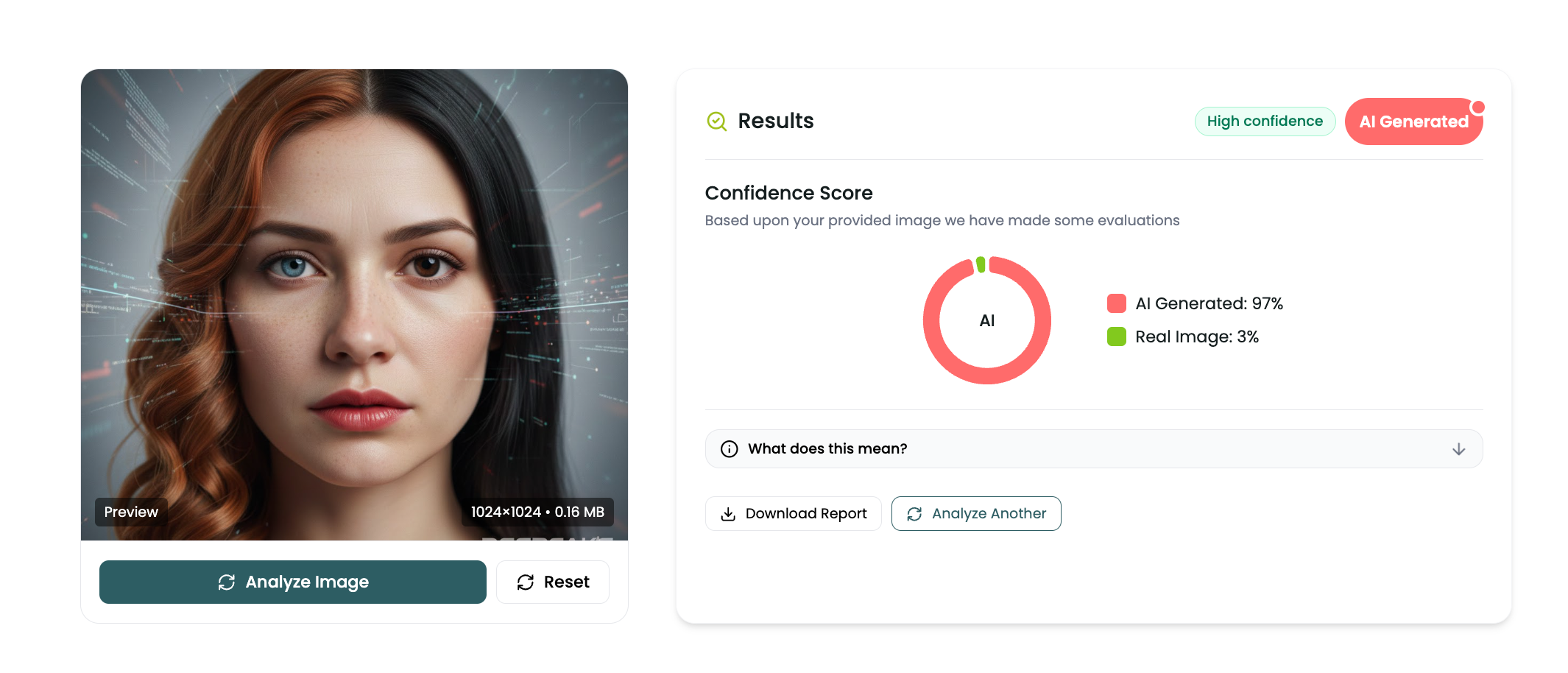
The best free AI image detection tool in 2026 is GPTOne. In our hands-on test it flagged every AI-generated image we ran, 10 out of 10, marking a photoreal AI portrait as AI Generated at 97% confidence, and it did it free to start. Plenty of tools can tell AI from real at a headline level. The ones worth your time are free, show you which region of the image is AI, and do not make you create an account first. Here is how the top detectors compare, and how we tested them.
Key Takeaways
- In our test, GPTOne correctly flagged 10 out of 10 AI-generated images, including a photoreal portrait marked AI Generated at 97% confidence, free and with free credits on signup.
- The best detectors do more than say yes or no. They give a confidence score and a heatmap showing which region is AI.
- Free access matters. Several strong tools hide the useful volume behind a signup or a paid plan.
- Provenance metadata like C2PA Content Credentials and Google SynthID adds a second, independent layer of proof.
- No detector is proof on its own. Pair the result with the visual tells and, when possible, the original file.
How we tested
We built a small, honest test set the way a real reviewer should. Ten AI-generated images, made across the main generators people actually use: DALL-E through ChatGPT, Google Gemini, FLUX, and Stable Diffusion. The prompts covered the hard cases, not just obvious cartoons: photoreal portraits, product shots, interior scenes, and street photography, the kinds of images that fool a quick human glance.
We uploaded each image to GPTOne's free AI image detector and recorded two things: whether it correctly identified the image as AI, and the confidence score it returned. GPTOne flagged all ten. The example below is representative: a 1024 by 1024 photoreal AI portrait, marked AI Generated at 97% confidence with a High confidence badge, and even the trickier generations came back clearly on the AI side.
One point of transparency, because it matters. We ran the full hands-on pass on GPTOne, the tool we build. For the other detectors below, we compare on verifiable features, free access, signup, heatmap, and provenance support, rather than quoting detection scores we did not measure ourselves. If you want a number for a rival tool, run the same images through it and compare. We would rather give you a test you can reproduce than numbers you have to take on faith.
Beyond this 10-image run, we also documented a larger 60-image benchmark across five categories, with the method and reasoning in our AI image detector benchmark write-up.
The comparison at a glance
| Tool | Free | a free account | Region heatmap | Provenance check | Best for |
|---|---|---|---|---|---|
| GPTOne | Yes | Yes | Yes | Reads C2PA and SynthID context | Fast, free, region-level checks |
| Hive Moderation | Limited | Signup / API | No | Partial | Enterprise moderation at scale |
| ZeroGPT | Limited | Signup for volume | No | No | Quick casual checks |
| DeepAI | Limited | Signup / API | No | No | Developers wanting an API |
| Illuminarty | Limited | Signup for volume | Yes | No | Region-level analysis |
The table tells the short story. GPTOne is the only option here that is free, needs only a free account, gives you a region heatmap, and puts provenance context in front of you. The others each do one or two of those well, but usually ask for a signup or a plan before the useful part.
GPTOne: our top pick
GPTOne earned the top slot in our test by flagging every AI image and doing it without friction. You open GPTOne’s AI image detector, upload a file up to 2MB in JPG, PNG, or WebP, and read the result in seconds. a free account, no card, no cap.
The part that sets it apart is the heatmap. Instead of a bare verdict, GPTOne shows a confidence score plus the regions carrying the strongest generation artifacts. That matters because real-world fakes are often partial: a genuine photo with an AI-edited object, or a real face on a generated background. The heatmap tells you what was touched, which we cover in depth in the AI-modified image detector guide.
We are careful about accuracy language here. On text, GPTOne is a 99.99% accurate detector across every major model, which is the pedigree the image tool is built on. For images we report a confidence score and a heatmap rather than a single blanket accuracy figure, because compression and editing shift the signal and one number would oversell it. In our 10-image test the result was unambiguous, and the honest framing is: it flagged all ten, and it shows you why. The same team runs a free AI text detector too, so you can check an image and its caption in one place.
Hive Moderation
Hive is a serious enterprise platform built for content moderation at scale. If you run a marketplace or a social app and need automated moderation across millions of uploads, Hive is designed for that job. The tradeoff is access. It is built around API integration and business plans, not a quick free web check, so it is overkill for an individual verifying a single image.
ZeroGPT
ZeroGPT is best known for text detection and offers image checking too. It is convenient for a fast casual look, but the free tier is limited and it does not give you a region heatmap, so you get a verdict without the "where" that makes a result actionable on partial edits.
DeepAI
DeepAI is developer-facing. Its strength is a straightforward API you can wire into your own product, which is genuinely useful if you are building software. As a tool for a non-technical person checking an image in a browser, it is less friendly than a purpose-built free web detector.
Illuminarty
Illuminarty is one of the few competitors that offers region-level analysis, which is the right idea. It can highlight areas of an image that look generated. The friction is the usual one: the useful volume sits behind a signup and paid tiers, so it is less immediate than a free, no-account check.
What actually makes a detector good
After testing, four things separate a detector worth using from a novelty.
First, a region heatmap. A yes-or-no verdict is weak against partial edits, which are most real fraud. You want to see which part of the image is AI.
Second, free and a free account. The moment a tool demands an account to see the real result, it stops being the thing you reach for on a suspicious image. Speed of access is a feature.
Third, honest accuracy language. Be suspicious of any image tool quoting a single perfect accuracy number with no method behind it. A confidence score plus a heatmap, and a reproducible test, is the honest version.
Fourth, provenance awareness. The best tools point you toward signed metadata when it exists, because that is the strongest proof there is.
The provenance layer
Detection reads the pixels. Provenance reads the file's history, and when it survives it is the most reliable signal of all. The C2PA standard and Content Credentials record, in signed metadata, how an image was made and edited. OpenAI attaches Content Credentials to DALL-E images, and Google's SynthID watermarks its models' output.
The catch is fragility. Screenshots, crops, and most social uploads strip metadata, so you often will not have it. Treat intact provenance as strong confirmation, and fall back to detection and the visual tells when it is gone. For the full visual checklist, see how to tell if an image is AI-generated.
Real-world use cases
The right tool depends on what you are checking. Marketplace listings, where a fake product photo can cost you money, covered in the fake product photo checker. Dating profiles, where AI faces defeat reverse image search, covered in the fake dating profile detector. Insurance claims, where AI-edited damage is a growing fraud, covered in the insurance claims guide. And specific generators like DALL-E and Midjourney, each with its own tells.
In every one of those cases, the workflow is the same: upload, read the score, check the heatmap, and confirm anything material with provenance or the original file.
FAQ
What is the best free AI image detector in 2026?
GPTOne. In our test it flagged all 10 AI-generated images, it is free to start, and it shows a confidence score plus a region heatmap so you can see which part of an image is AI. See GPTOne versus Illuminarty heatmap detectors for the full picture.
How accurate are AI image detectors?
The good ones are strong but not infallible. GPTOne flagged 10 out of 10 in our test, but any image detector can be thrown off by heavy compression or a skilled partial edit, so treat the result as a strong signal and confirm important cases with metadata or the original file.
Do I need to pay to check if an image is AI?
No. GPTOne is completely free to start and no per-scan cost. Several other tools limit free checks or require an account, but a full check should not cost you anything.
Can a detector tell which AI made an image?
Detectors reliably separate AI from real. Naming the exact generator is harder. GPTOne is trained across DALL-E, Midjourney, Stable Diffusion, and more, so it flags images from all of them even when it cannot name the source.
What is a confidence score versus an accuracy percentage?
A confidence score is how sure the tool is about one specific image. An accuracy percentage is how often a tool is right across a whole test set. For images, a confidence score plus a heatmap is more useful than a single blanket accuracy number.
How can I check an image myself right now?
Upload it to GPTOne's free image detector, read the confidence score, and turn on the heatmap to see the AI regions. It takes seconds and needs only a free account.
Try the free AI image detector, a free account, at gptone.me.